
🎉 Get 40% off Pre-Book Now →
How to Replace Date/Time Battery

Skip to main content
PurrfectBackup Knowledge Base
Why Battery?
PurrfectBackup runs offline and in order to keep time , battery is required. You can run it without battery but date/time will not get updated once it is shutdown for long duration
How to replace battery
Please refer to diagram below to replace battery
- Unscrew two screws at the bottom
- Slide the plate carefully to expose the battery compartment
- Gently nudge the tab of battery compartment to raise it slightly or wedge with flat tool and pull out in direction as show in diagram below
- Battery might be little tight, so you might need to use non conductive pliers to get them off
- Replace with new CR2032 battery
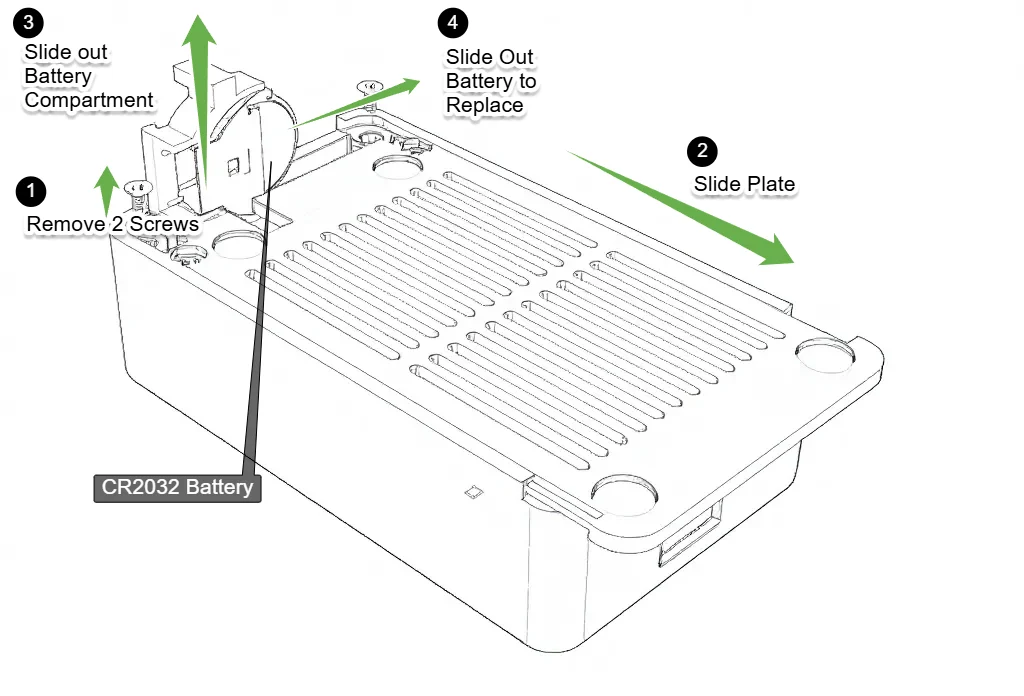
- Follow directions in reverse order to assemble back , make sure to tuck in wires neatly when sliding down battery compartment.
- Once done, please boot up PurrfectBackup and go to Settings > Date/Time to set current date and time
⚠️ HANDLING CAUTION: CR2032 BATTERY When removing CR2032 coin cell battery with pliers:
- Cover with cloth to improve grip and prevent slipping
- Use gentle, even pressure – do not crush or puncture
- Avoid short-circuiting the terminals with metal tools
- Do not bend or damage the battery compartment
Note: While CR2032 batteries contain minimal lithium, puncturing can cause leakage or, in rare cases, minor thermal reaction.